Schema Classes in AdonisJS 7: A Deep Dive

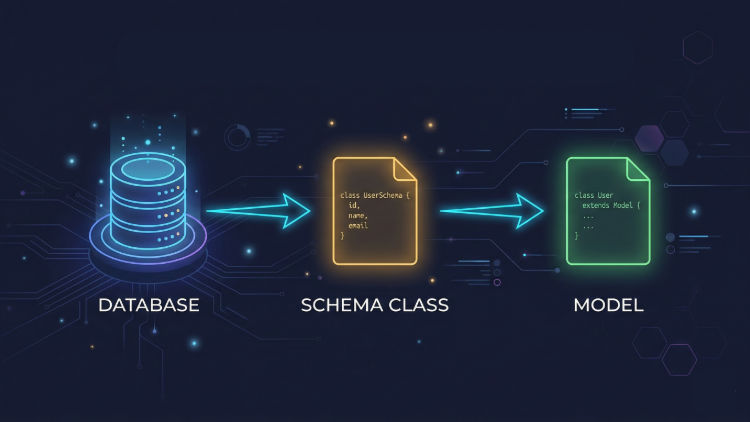
AdonisJS 7 ships with a feature that quietly eliminates one of the most tedious parts of working with Lucid models: manually re-declaring every column you already defined in a migration. If you have been in the AdonisJS space long enough, you know this is a real pain. The solution is schema classes—auto-generated TypeScript classes that sit between BaseModel and your model, carrying all the column definitions, so your model doesn't have to.
This article breaks down what schema classes are, how they get generated, what they look like in practice, and where the boundaries lie between what the framework manages and what you own.
The Problem They Solve
In AdonisJS 6, creating a model for a job_listings table looked roughly like this:
// v6 — app/models/job_listing.ts
import { BaseModel, column } from '@adonisjs/lucid/orm'
import { DateTime } from 'luxon'

export default class JobListing extends BaseModel {
  @column({ isPrimary: true })
  declare id: number

  @column()
  declare title: string

  @column()
  declare description: string

  @column()
  declare location: string

  @column()
  declare salaryMin: number | null

  @column()
  declare salaryMax: number | null

  @column()
  declare employerId: number

  @column()
  declare status: string

  @column.dateTime({ autoCreate: true })
  declare createdAt: DateTime

  @column.dateTime({ autoCreate: true, autoUpdate: true })
  declare updatedAt: DateTime | null
}
Every column you wrote in the migration, you wrote again here. The migration is the source of truth for the database schema, yet the model had to repeat each column name, type, and decorator option. A column rename in a migration required a corresponding rename in the model. Nullable columns had to be flagged in both places. The two files drifted apart whenever you forgot to synchronise them.
AdonisJS 7 addresses this with a dedicated layer — schema classes that generates the column declarations from the actual database after migrations run.
What Schema Classes Are
A schema class is a TypeScript class that extends BaseModel and declares all the columns for a given database table. It lives in database/schema.ts alongside all other schema classes for your application. You never write this file, instead, Lucid generates and overwrites it automatically every time you run migrations.
Your model then extends its corresponding schema class instead of BaseModel directly:
// v7 — app/models/job_listing.ts
import { JobListingSchema } from '#database/schema'

export default class JobListing extends JobListingSchema {}
That's the entire model file for a table with ten columns. The model class body is empty by default. All column declarations, their types, and their decorators come through inheritance from JobListingSchema.
How Generation Works
The schema generation follows a migrations-first model. Migrations remain the single source of truth for the database schema. When you run node ace migration:run, Lucid executes the migrations as usual, then scans the database and introspects the resulting table structure. From that introspection, it generates (or regenerates) the schema classes in database/schema.ts.
This means the generated types always reflect the actual database, not what Lucid thinks the database looks like. A column that defaults to null in the database becomes string | null in the schema class. A non-nullable string becomes string. Lucid doesn't infer this from the migration file itself, it reads it from the live schema.
Consider this migration for a candidates table:
// database/migrations/1700000000001_create_candidates_table.ts
import { BaseSchema } from '@adonisjs/lucid/schema'

export default class extends BaseSchema {
  protected tableName = 'candidates'

  async up() {
    this.schema.createTable(this.tableName, (table) => {
      table.increments('id')
      table.string('full_name').notNullable()
      table.string('email').notNullable().unique()
      table.string('phone').nullable()
      table.text('resume_summary').nullable()
      table.string('linkedin_url').nullable()
      table.timestamp('created_at', { useTz: true })
      table.timestamp('updated_at', { useTz: true })
    })
  }

  async down() {
    this.schema.dropTable(this.tableName)
  }
}
After node ace migration:run, Lucid adds the following to database/schema.ts:
// database/schema.ts (auto-generated — never edit this file)
import { BaseModel, column } from '@adonisjs/lucid/orm'
import { DateTime } from 'luxon'

export class CandidateSchema extends BaseModel {
  static $columns = [
    'id',
		'fullName',
		'email',
		'phone',
    'resumeSummary',
		'linkedinUrl',
		'createdAt',
		'updatedAt'
  ] as const

  $columns = CandidateSchema.$columns

  @column({ isPrimary: true })
  declare id: number

  @column()
  declare fullName: string | null

  @column()
  declare email: string

  @column()
  declare phone: string | null

  @column()
  declare resumeSummary: string | null

  @column()
  declare linkedinUrl: string | null

  @column.dateTime({ autoCreate: true })
  declare createdAt: DateTime

  @column.dateTime({ autoCreate: true, autoUpdate: true })
  declare updatedAt: DateTime | null
}
Notice a few things here. The snake_case column names from the migration (full_name, resume_summary) are translated to camelCase property names (fullName, resumeSummary) following Lucid's default naming strategy. Nullability is correctly reflected — phone and resumeSummary are string | null because the migration declared them .nullable(). The $columns tuple tracks all column names at both the class and instance level, which Lucid uses internally for serialisation and query building.
With the schema class generated, the Candidate model file stays lean:
// app/models/candidate.ts
import { CandidateSchema } from '#database/schema'

export default class Candidate extends CandidateSchema {}
This model is immediately queryable:
const candidates = await Candidate.all()
const candidate = await Candidate.findOrFail(1)
const activeApplicants = await Candidate.query()
  .whereNotNull('linkedinUrl')
  .orderBy('createdAt', 'desc')
Every property — candidate.fullName, candidate.email, candidate.resumeSummary is typed correctly without any manual declaration.
What Stays in the Model
Schema classes handle column declarations. Everything else belongs in your model file. This separation is deliberate: the framework manages what changes when the database changes; you manage the behaviour that reflects your domain.
Relationships, hooks, computed properties, and domain methods are yours to own. The schema class has no opinion about them.
Relationships
// app/models/candidate.ts
import { hasMany } from '@adonisjs/lucid/orm'
import type { HasMany } from '@adonisjs/lucid/types/relations'
import { CandidateSchema } from '#database/schema'
import Application from '#models/application'

export default class Candidate extends CandidateSchema {
  @hasMany(() => Application)
  declare applications: HasMany<typeof Application>
}
Hooks
import { beforeSave } from '@adonisjs/lucid/orm'
import hash from '@adonisjs/core/services/hash'
import { CandidateSchema } from '#database/schema'

export default class Candidate extends CandidateSchema {
  @beforeSave()
  static async hashPassword(candidate: Candidate) {
    if (candidate.$dirty.password) {
      candidate.password = await hash.make(candidate.password)
    }
  }
}
Computed Properties
import { computed } from '@adonisjs/lucid/orm'
import { CandidateSchema } from '#database/schema'

export default class Candidate extends CandidateSchema {
  @computed()
  get displayName() {
    return this.fullName ?? this.email.split('@')[0]
  }
}
Domain Methods
import { CandidateSchema } from '#database/schema'
import Application from '#models/application'

export default class Candidate extends CandidateSchema {
  async hasAppliedTo(jobListingId: number): Promise<boolean> {
    const application = await Application.query()
      .where('candidateId', this.id)
      .where('jobListingId', jobListingId)
      .first()

    return application !== null
  }

  async withdraw(applicationId: number): Promise<void> {
    await Application.query()
      .where('id', applicationId)
      .where('candidateId', this.id)
      .delete()
  }
}
Working with Existing Databases
One practical benefit of schema classes is that they work independently of migration history. If you're connecting Lucid to a pre-existing database — a legacy PostgreSQL instance, a database managed by another team, or a schema that predates your AdonisJS project — you don't need to recreate migrations for every table.
Rather than running migrations, you use the dedicated node ace schema:generate command to introspect the live database and generate schema classes from its current structure. The schema classes represent the live database as it actually exists, so your models inherit accurate types regardless of how that structure came to be.
The Golden Rule
database/schema.ts is owned by the framework. Every migration run overwrites it. Any manual edits you make to the file will be lost the next time migrations execute.
This is intentional. The file is not a place to add custom logic — it's a generated artefact that mirrors the database. Business logic, computed properties, and custom decorators belong in the model file, which the framework never touches.
If you want to change how a column maps to the database — its nullability, its default value, its underlying type, the correct path is to write a new migration and re-run it. But if you would like to change only how a column is represented in TypeScript — its declared type, its decorator options, the imports it pulls in, the correct path is database/schema_rules.ts. That distinction is the one worth internalising: database concerns belong in migrations, TypeScript representation concerns belong in schema rules.
A Complete Example: The JobListing Model
To put it all together, here's a JobListing model that makes full use of the schema class foundation while layering domain behaviour on top:
// database/migrations/1700000000002_create_job_listings_table.ts
import { BaseSchema } from '@adonisjs/lucid/schema'

export default class extends BaseSchema {
  protected tableName = 'job_listings'

  async up() {
    this.schema.createTable(this.tableName, (table) => {
      table.increments('id')
      table.integer('employer_id').unsigned().references('employers.id').onDelete('CASCADE')
      table.string('title').notNullable()
      table.text('description').notNullable()
      table.string('location').notNullable()
      table.string('type').defaultTo('full_time')  // full_time | part_time | contract
      table.integer('salary_min').nullable()
      table.integer('salary_max').nullable()
      table.enum('status', ['draft', 'published', 'closed']).defaultTo('draft')
      table.timestamp('published_at', { useTz: true }).nullable()
      table.timestamp('created_at', { useTz: true })
      table.timestamp('updated_at', { useTz: true })
    })
  }

  async down() {
    this.schema.dropTable(this.tableName)
  }
}
After running migrations, Lucid generates a JobListingSchema class in database/schema.ts with all eleven columns properly typed. The model then extends it and adds everything specific to the job listing domain:
// app/models/job_listing.ts
import { belongsTo, hasMany, scope } from '@adonisjs/lucid/orm'
import type { BelongsTo, HasMany } from '@adonisjs/lucid/types/relations'
import { DateTime } from 'luxon'
import { JobListingSchema } from '#database/schema'
import Employer from '#models/employer'
import Application from '#models/application'

export default class JobListing extends JobListingSchema {
  // Relationships
  @belongsTo(() => Employer)
  declare employer: BelongsTo<typeof Employer>

  @hasMany(() => Application)
  declare applications: HasMany<typeof Application>

  // Query Scopes
  static published = scope((query) => {
    query.where('status', 'published').whereNotNull('published_at')
  })

  static openToApplicants = scope((query) => {
    query.where('status', 'published').where('type', '!=', 'closed')
  })

  // Domain Methods
  async publish(): Promise<void> {
    this.status = 'published'
    this.publishedAt = DateTime.now()
    await this.save()
  }

  async close(): Promise<void> {
    this.status = 'closed'
    await this.save()
  }

  get hasSalaryRange(): boolean {
    return this.salaryMin !== null && this.salaryMax !== null
  }

  get salaryLabel(): string {
    if (!this.hasSalaryRange) return 'Salary not disclosed'
    return `$${this.salaryMin!.toLocaleString()} – $${this.salaryMax!.toLocaleString()}`
  }
}
This model is fifteen lines of actual behaviour with no column boilerplate. The id, title, description, location, type, salaryMin, salaryMax, status, publishedAt, createdAt, and updatedAt properties are all available and typed through inheritance from JobListingSchema, without being declared anywhere in this file.
Customising Generated Schema Classes with Schema Rules
The introspection defaults serve most tables well, but they can't know everything about your domain. A json column storing a structured payload should probably be typed as a specific interface, not any. A varchar holding role values is better typed as a string union than a bare string. A bigint column might belong as TypeScript's bigint rather than number. This is where schema rules come in.
Schema rules let you override how Lucid maps column types to TypeScript in the generated schema class. They live in database/schema_rules.ts — a TypeScript file, which Lucid reads during every generation pass.
The schema_rules.ts Structure
The file exports a default object typed as SchemaRules, with two top-level keys: types for global rules that apply to all columns of a given internal type, and tables for rules scoped to specific table-column pairs.
// database/schema_rules.ts
import { type SchemaRules } from '@adonisjs/lucid/types/schema_generator'

export default {
  types: {},
  tables: {},
} satisfies SchemaRules
Each rule accepts three fields:
decorator: specifies the decorator string that replaces Lucid's default.tsType: sets the TypeScript type string for the property declaration.imports: is an array of objects, each with asource(the module path) andtypeImports(an array of named exports to import), which Lucid adds todatabase/schema.tswhen the rule is applied.
Global Type Rules
Global rules target Lucid's internal type system — the abstraction layer between database-specific column types and TypeScript types. When Lucid introspects a column, it first maps the raw database type (like jsonb or bigint) to an internal type name, then applies any matching global rule to that internal type.
The internal types you can target are: number, bigint, decimal, boolean, string, date, time, DateTime, binary, json, jsonb, uuid, enum, set, and unknown.
A common use case is changing all json columns from any to a typed wrapper, and opting bigint columns into TypeScript's native bigint instead of number:
// database/schema_rules.ts
import { type SchemaRules } from '@adonisjs/lucid/types/schema_generator'

export default {
  types: {
    json: {
      decorator: '@column()',
      tsType: 'JSON<any>',
      imports: [
        { source: '#types/db', typeImports: ['JSON'] },
      ],
    },
    bigint: {
      decorator: '@column.bigInteger()',
      tsType: 'bigint',
    },
  },
  tables: {},
} satisfies SchemaRules
With the json rule active, every JSON column across all tables generates as:
@column()
declare metadata: JSON<any>
Rather than the default declare metadata: any. The JSON<any> type wrapper can be defined in your types module:
// app/types/db.ts
export type JSON<T> = T
This gives you a hook to tighten specific columns later at the model level, narrowing JSON<any> to a concrete shape without contradicting the schema class.
Per-Table Column Rules
When you need a rule that applies only to a specific column in a specific table, nest it under tables. In the job board domain, the status column in job_listings defaults to string because it's backed by an enum or varchar — a per-table rule makes it precise. Note the required columns key inside each table entry:
// database/schema_rules.ts
import { type SchemaRules } from '@adonisjs/lucid/types/schema_generator'

export default {
  types: {},
  tables: {
    job_listings: {
      columns: {
        status: {
          decorator: '@column()',
          tsType: `'draft' | 'published' | 'closed'`,
        },
        type: {
          decorator: '@column()',
          tsType: `'full_time' | 'part_time' | 'contract'`,
        },
      },
    },
    applications: {
      columns: {
        status: {
          decorator: '@column()',
          tsType: `'pending' | 'reviewing' | 'shortlisted' | 'rejected' | 'accepted'`,
        },
      },
    },
  },
} satisfies SchemaRules
The status column exists in both job_listings and applications but carries a different union type in each. After running migrations with these rules, Lucid generates schema classes with accurate union types rather than bare string, giving you exhaustive narrowing throughout your model methods and query scopes.
For union types that are shared across multiple files, you can extract them and import them instead of in-lining them:
tables: {
  job_listings: {
    columns: {
      status: {
        decorator: '@column()',
        tsType: 'JobListingStatus',
        imports: [
          { source: '#models/types/job_listing', typeImports: ['JobListingStatus'] },
        ],
      },
    },
  },
},
Combining Global and Table Rules
Both sections work together. Table-specific column rules always take precedence over global type rules, so you can set a broad default via types and carve out exceptions via tables. In this example, all JSON columns default to JSON<any> globally, but posts.metadata is refined to a specific shape:
// database/schema_rules.ts
import { type SchemaRules } from '@adonisjs/lucid/types/schema_generator'

export default {
  types: {
    json: {
      decorator: '@column()',
      tsType: 'JSON<any>',
      imports: [{ source: '#types/db', typeImports: ['JSON'] }],
    },
  },
  tables: {
    posts: {
      columns: {
        metadata: {
          decorator: '@column()',
          tsType: 'JSON<{ title?: string; description?: string; ogImage?: string }>',
          imports: [{ source: '#types/db', typeImports: ['JSON'] }],
        },
      },
    },
  },
} satisfies SchemaRules
When to Regenerate
Schema rules are applied whenever Lucid generates schema classes. After modifying database/schema_rules.ts, regenerate without running a migration using the dedicated command:
node ace schema:generateSchemas are also regenerated automatically on node ace migration:run and node ace migration:rollback.
What Schema Rules Are Not
Schema rules only control what Lucid writes into database/schema.ts. They don't validate data, enforce constraints at the database level, or affect how Lucid reads from or writes to the database at runtime. A column declared as 'draft' | 'published' | 'closed' in a schema rule still reads and writes the underlying varchar — the rule is purely a TypeScript representation concern.
Summary
Schema classes in AdonisJS 7 establish a clean contract: migrations own the database structure, Lucid generates a typed representation of that structure, and your models inherit it. The schema file is a generated artefact, which you should never edit. Your model files carry relationships, hooks, computed properties, and domain methods — the things that don't belong anywhere else.
The practical payoff is models that stay narrow and focused. Adding a column means writing a migration and running it. The model picks up the change on its next query without any manual update. Renaming a column in a migration propagates to the schema class automatically. The two files that used to drift apart no longer need to be synchronised by hand.
For teams working with existing databases, schema generation makes Lucid viable without requiring a complete migration history. You introspect the live schema, get typed classes, and build models on top of them. The workflow scales from greenfield projects to legacy database integrations with the same mechanism.