AdonisJS 7 Transformers: A Deep Dive
AdonisJS 7 landed in February 2026 with one headline feature: end-to-end type safety. Among the many improvements that support this goal are auto-named routes, a type-safe URL builder, barrel file generation, and transformers. Transformers stand out as perhaps the most architecturally significant change.
If you've been building APIs or full-stack apps with AdonisJS for a while, you've almost certainly hit the pain point transformers solve: returning raw Lucid model instances from controllers with no clear contract on what the serialized output looks like, which fields are exposed, and what shape the client can rely on. In AdonisJS 7, that problem has a dedicated solution.
This article takes you deep into how transformers work, the problems they solve, how to use them effectively, and some advanced patterns that make them genuinely powerful — including paginated responses and passing custom contextual data into transformers. We'll build examples around a job board application to keep things concrete throughout.
The Problem With v6 Serialization
In AdonisJS 6, serialization lived on the model. When a controller returned a Lucid model, the framework called toJSON() on it implicitly, serializing whatever columns and relationships the model exposed. To hide a field, you annotated it with serializeAs: null. To rename one, you used serializeAs: 'newName'.
This approach had three practical problems.
First, it mixed concerns. A model is your persistence layer. When you start encoding presentation logic inside it, which fields to expose, how to format dates, what to alias — you've coupled two layers that should be independent. When a new API endpoint needs to return a different shape of the same model (say, a public job listing vs. an employer's private view of applicants), you're stuck.
Second, it had no type safety. Nothing in the TypeScript type system knew what the serialized output of a model looked like. You could rename a salary column, accidentally expose a candidate's hashed password, or drop a relationship field, and the compiler said nothing. The error surfaced at runtime or worse, in a production data leak.
Third, it made relationships awkward. Including related data meant eagerly loading it and hoping the serialization config handled it correctly. There was no explicit control over what related data was included, at what depth, and in what shape.
Transformers fix all three.
What is a Transformer?
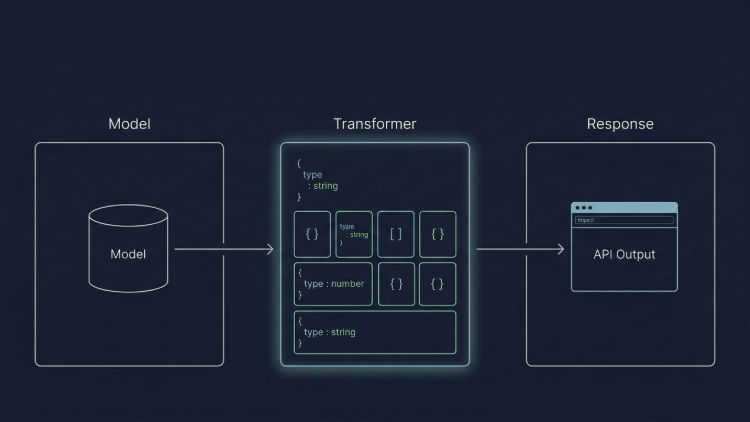
A Transformer is a dedicated class responsible for defining how a piece of data should look when it leaves your application. It separates serialization from persistence and makes the output shape explicit, typed, and reusable.
Every transformer extends BaseTransformer from @adonisjs/core/transformers, which accepts the model as a generic. This ensures your code editor knows exactly what properties exist on the model. Also, every transformer implements at minimum a toObject() method that returns a plain JavaScript object. It dictates the exact shape of the returned JSON.
Here's a transformer for a JobListing model on our job board:
import { BaseTransformer } from '@adonisjs/core/transformers'
import type JobListing from '#models/job_listing'

export default class JobListingTransformer extends BaseTransformer<JobListing> {
  toObject() {
    return {
      id: this.resource.id,
      title: this.resource.title,
      location: this.resource.location,
      employmentType: this.resource.employmentType, *// 'full-time' | 'part-time' | 'contract'*
      salaryRange: `${this.resource.salaryCurrencyCode} ${this.resource.salaryMin}–${this.resource.salaryMax}`,
      publishedAt: this.resource.publishedAt.toISO(),
    }
  }
}
Notice a few things. The raw salaryMin, salaryMax, and salaryCurrencyCode columns are not sent individually; instead, they're composed into a human-readable string. The publishedAt DateTime is formatted as ISO. And implicitly, sensitive internal fields like internalBudgetNote, recruiterEmail, or the employer's private accountManagerId are never mentioned. Exclusion is as simple as not including something.
Inside toObject(), this.resource holds the data being transformed, in this case, a JobListing instance. The method can return any JSON-serializable object.
Creating Your First Transformer
You don't have to create transformer files by hand. AdonisJS 7 ships a make:transformer command. Let’s say we want to expose our JobListing model. We can generate a transformer by running:
node ace make:transformer job_listingThis creates app/transformers/job_listing_transformer.ts with a scaffolded class ready to fill in. The transformers directory is scanned automatically and included in the generated barrel file, so it's importable throughout your application without manual registration.
Using Transformers in Controllers
BaseTransformer exposes a static transform method. You call it with your data and pass the result to the serialize helper available on HttpContext.
import JobListingTransformer from '#transformers/job_listing_transformer'
import type { HttpContext } from '@adonisjs/core/http'

export default class JobListingsController {
  async show({ params, serialize }: HttpContext) {
    const listing = await JobListing.findOrFail(params.id)

    return serialize(JobListingTransformer.transform(listing))
  }
}
serialize awaits any async transformations, resolves them, and returns the final object as an HTTP response. You never manually call toJSON, loop over results, or wrestle with serialization config on the model.
{
	"data": {
		"id": 27,
		"title": "Lead Applications Architect (Senior)",
		"location": "Hemet, LY",
		"employmentType": "contract",
		"salaryRange": "$55,216 - $131,055 USD",
		"publishedAt": "2026-03-01T05:35:51.000+00:00"
	}
}
For collections, transform automatically detects whether the input is an array or a single instance.
async index({ serialize }: HttpContext) {
  const listings = await JobListing.query().where('status', 'published')

  return serialize(JobListingTransformer.transform(listings)) // returns an array
}
{
"data": [
{
"id": 27,
"title": "Lead Applications Architect (Senior)",
"location": "Hemet, LY",
"employmentType": "contract",
"salaryRange": "$55,216 - $131,055 USD",
"publishedAt": "2026-03-01T05:35:51.000+00:00"
},
{
"id": 15,
"title": "Product Marketing Consultant (Senior)",
"location": "Linden, VN",
"employmentType": "contract",
"salaryRange": "€84,947 - €215,433 EUR",
"publishedAt": "2026-03-01T05:35:51.000+00:00"
}
]
}The pick and omit Helpers
When a model has many columns, and you need most of them, spelling each out individually gets tedious. Transformers expose a pick helper that pulls a subset of properties from the model in a fully type-safe way.
toObject() {
  return {
    ...this.pick(this.resource, ['id', 'title']),
    salaryRange: `${this.resource.salaryCurrencyCode} ${this.resource.salaryMin}–${this.resource.salaryMax}`,
    publishedAt: this.resource.publishedAt.toISO(),
  }
}
{
"data": {
"id": 27,
"title": "Lead Applications Architect (Senior)",
"salaryRange": "$55,216 - $131,055 USD",
"publishedAt": "2026-03-01T05:35:51.000+00:00"
}
}Because pick is type-safe, passing a key that doesn't exist on the model is a TypeScript error at compile time, not a silent undefined at runtime.
Conversely, the omit helper does the opposite of the pick helper. It omits the specified keys from the data object and returns the remaining data.
Transformer Variants
Sometimes the same model needs a different shape depending on the context. A candidate browsing listings sees different data than an employer reviewing applicants, and both see less than an internal admin.
Rather than creating three separate transformer classes, you define variants. Variants are additional methods that return different shapes:
export default class CandidateTransformer extends BaseTransformer<Candidate> {
  // Public profile — anyone can see this
  toObject() {
    return {
      id: this.resource.id,
      displayName: this.resource.displayName,
      headline: this.resource.headline,
      location: this.resource.location,
      avatarUrl: this.resource.avatarUrl,
    }
  }

  // Employer view — shown when reviewing an application
  forEmployerObject() {
    return {
      ...this.toObject(),
      yearsOfExperience: this.resource.yearsOfExperience,
      skills: this.resource.skills,
      resumeUrl: this.resource.resumeUrl,
    }
  }

  // Admin view — includes internal flags and account details
  forAdminObject() {
    return {
      ...this.forEmployerObject(),
      email: this.resource.email,
      accountStatus: this.resource.accountStatus,
      flaggedForReview: this.resource.flaggedForReview,
      createdAt: this.resource.createdAt.toISO(),
    }
  }
}
Then, in your controller, you use the useVariant method and pass the variant name:
return serialize(CandidateTransformer.transform(candidate).useVariant('forEmployerObject'))

return serialize(CandidateTransformer.transform(candidate).useVariant('forAdminObject))
The toObject is used by default when no variant is specified.
Handling Relationships
This is where transformers become really powerful. Related data is handled by composing transformers. Basically, you reference another transformer inside toObject().
Imagine a job listing that belongs to an employer and has many applications:
import { BaseTransformer } from '@adonisjs/core/transformers'
import EmployerTransformer from '#transformers/employer_transformer'
import ApplicationTransformer from '#transformers/application_transformer'
import type JobListing from '#models/job_listing'

export default class JobListingTransformer extends BaseTransformer<JobListing> {
  toObject() {
    return {
      ...this.pick(this.resource, ['id', 'title', 'location', 'employmentType']),
      publishedAt: this.resource.publishedAt.toISO(),
      employer: EmployerTransformer.transform(this.resource.employer),
      applications: ApplicationTransformer.transform(this.resource.applications),
    }
  }
}
To prevent undefined errors and accidental N+1 queries, transformers provide the whenLoaded method, which can be used to guard against relationships that weren't eagerly preloaded.
Therefore, the transformer above can be rewritten as:
import { BaseTransformer } from '@adonisjs/core/transformers'
import EmployerTransformer from '#transformers/employer_transformer'
import ApplicationTransformer from '#transformers/application_transformer'
import type JobListing from '#models/job_listing'

export default class JobListingTransformer extends BaseTransformer<JobListing> {
  toObject() {
    return {
      ...this.pick(this.resource, ['id', 'title', 'location', 'employmentType']),
      publishedAt: this.resource.publishedAt.toISO(),
      employer: EmployerTransformer.transform(this.whenLoaded(this.resource.employer)),
      applications: ApplicationTransformer.transform(this.whenLoaded(this.resource.applications)),
    }
  }
}
whenLoaded checks whether a relationship has been eagerly preloaded. If it hasn't, the field is omitted from the output entirely.
In your controller, you control exactly which relationships are loaded:
async show({ params, serialize }: HttpContext) {
  const listing = await JobListing.query()
    .where('id', params.id)
    .preload('employer')
    *// Not preloading 'applications', so it's omitted from the response*
    .firstOrFail()

  return serialize(JobListingTransformer.transform(listing))
}
Controlling Serialization Depth
By default, transformers serialize relationships one level deep. This is a deliberate, conservative default, as it prevents accidentally shipping deeply nested data the client never asked for.
When you need more depth, you opt in explicitly:
toObject() {
  return {
    ...this.pick(this.resource, ['id', 'name', 'industry']),
    listings: JobListingTransformer.transform(this.resource.listings).depth(2),
    // Serializes: employer → listings → applications (2 levels deep)
  }
}
The opt-in design is the important part. Depth is conservative by default and expanded consciously, keeping API responses predictable.
Counting Related Records
A common pattern is including a count of related records without loading the records themselves. On a job board, you might want to show applicantsCount on a listing without loading all the application rows.
Transformers support this with the withCount method:
toObject() {
  return {
    ...this.pick(this.resource, ['id', 'title', 'location', 'employmentType']),
    publishedAt: this.resource.publishedAt.toISO(),
    applicantsCount: this.withCount('applications'),
  }
}
This integrates with Lucid's withCount query builder method. As long as you've queried with withCount, the counts are available in the transformer without loading any related rows:
JobListing.query()
  .withCount('applications')
If you forget to apply the withCount on a query, you’d get an undefined error from the transformer. To mitigate this, there’s another method you can use to achieve the same thing “safely”.
In addition to the withCount method, you can also use the whenCounted method. The whenCounted method is similar to the whenLoaded method; the property will only be included in the response when the withCount is applied on the query, otherwise, it will be omitted.
toObject() {
  return {
    ...this.pick(this.resource, ['id', 'title', 'location', 'employmentType']),
    publishedAt: this.resource.publishedAt.toISO(),
    applicantsCount: this.whenCounted('applications'),
  }
}
Paginated Responses
Most listing endpoints on a job board don't return everything at once. They paginate the listings. Transformers have first-class support for paginated Lucid results through the paginate static method.
The paginate method accepts two arguments: the paginated data and the pagination metadata.
In your controller, run a paginated query using Lucid's .paginate() method and pass the result directly to paginate:
export default class JobListingsController {
  async index({ request, serialize }: HttpContext) {
    const page = request.input('page', 1)
    const limit = request.input('limit', 20)

    const listings = await JobListing.query()
      .where('status', 'published')
      .orderBy('publishedAt', 'desc')
      .paginate(page, limit)

	 const metadata = listings.getMeta()

    return serialize(JobListingTransformer.transformPaginated(listings, metadata))
  }
}
The response shape wraps the transformed data in a pagination envelope that includes metadata about the current page, total records, and whether more pages exist:
{
	"data": [
		{
			"id": 27,
			"title": "Lead Applications Architect (Senior)",
			"location": "Hemet, LY",
			"employmentType": "contract",
			"salaryRange": "$55,216 - $131,055 USD",
			"publishedAt": "2026-03-01T05:35:51.000+00:00",
			"employer": {
				"id": 4,
				"name": "Zemlak, Blick and Hoppe",
				"industry": "Retail",
				"website": "https://valuable-loyalty.net",
				"logoUrl": "https://picsum.photos/seed/0FrYXtDp/3291/2918"
			}
		},
		{
			"id": 15,
			"title": "Product Marketing Consultant (Senior)",
			"location": "Linden, VN",
			"employmentType": "contract",
			"salaryRange": "€84,947 - €215,433 EUR",
			"publishedAt": "2026-03-01T05:35:51.000+00:00",
			"employer": {
				"id": 3,
				"name": "McLaughlin - Greenfelder",
				"industry": "Technology",
				"website": "https://substantial-atrium.net/",
				"logoUrl": "https://picsum.photos/seed/Nmyx36Q/759/3478"
			}
		}
	],
	"metadata": {
		"total": 32,
		"perPage": 20,
		"currentPage": 1,
		"lastPage": 2,
		"firstPage": 1,
		"firstPageUrl": "/?page=1",
		"lastPageUrl": "/?page=2",
		"nextPageUrl": "/?page=2",
		"previousPageUrl": null
	}
}
The metadata block is generated automatically from Lucid's ModelPaginator. You get it using the getMeta method and pass it as the second argument to the transformer paginate method.
Dependency Injection
Similar to almost every aspect of AdonisJS, transformer methods can inject dependencies from the AdonisJS IoC container using the @inject() decorator. This is useful when you require access to services or context information during transformation, such as checking permissions, calling a service, or reading from a cache.
Say you want to include a canWithdraw flag on an application, but computing it requires a service call:
import { inject } from '@adonisjs/core'
import { BaseTransformer } from '@adonisjs/core/transformers'
import WithdrawalService from '#services/withdrawal_service'
import type Application from '#models/application'

export default class ApplicationTransformer extends BaseTransformer<Application> {
  toObject() {
    return {
      ...this.pick(this.resource, ['id', 'status', 'coverLetter']),
      submittedAt: this.resource.submittedAt.toISO(),
    }
  }

  @inject()
  async forEmployerObject(withdrawalService: WithdrawalService) {
    const deadline = await withdrawalService.getDeadline(this.resource.id)
    const canWithdraw =
      deadline !== null && deadline > DateTime.now() && this.resource.status !== 'withdrawn'

    return {
      ...this.toObject(),
      withdrawalDeadline: deadline?.toISO() ?? null,
      canWithdraw,
      recruiterNote: this.resource.recruiterNote,
      candidate: CandidateTransformer.transform(this.whenLoaded(this.resource.candidate)),
    }
  }
}
Because transformers are resolved through the AdonisJS IoC container, the @inject decorator wires up dependencies automatically. Logic that would otherwise scatter across controllers and view helpers now lives in one place, and it's unit-testable in isolation.
Passing Custom Data to Transformers
Sometimes this.resource alone isn't enough to compute the serialized output. You may need to pass in contextual data that isn't part of the model. For example, a feature flag, a locale setting, or any other caller-controlled context.
Transformers support this through a second argument to the transform method. First, you need to specify that you want to pass custom data to a transformer by accepting additional parameters in the transformer's constructor. These parameters come after the resource parameter in the constructor.
Here's a practical example: on the job board's listings index, each listing should include whether the authenticated candidate has already applied to it. That information isn't on the JobListing model—it depends on who's asking.
First, define the custom data inside the transformer:
import { BaseTransformer } from '@adonisjs/core/transformers'
import type JobListing from '#models/job_listing'

export default class JobListingTransformer extends BaseTransformer<JobListing> {
  constructor(
    resource: JobListing,
    protected appliedIds: number[]
  ) {
    super(resource)
  }

  toObject() {
    return {
      ...this.pick(this.resource, ['id', 'title', 'location', 'employmentType', 'remote']),
      salaryRange: `${this.resource.salaryCurrencyCode} ${this.resource.salaryMin}–${this.resource.salaryMax}`,
      publishedAt: this.resource.publishedAt.toISO(),
      hasApplied: this.appliedIds?.includes(this.resource.id) ?? false,
    }
  }
}
Then, pass the custom data from the controller:
export default class JobListingsController {
  async index({ request, auth, serialize }: HttpContext) {
    const candidate = await auth.getUserOrFail()
    const page = request.input('page', 1)

    const [listings, appliedIds] = await Promise.all([
      JobListing.query().where('status', 'published').paginate(page, 20),

candidate.related('applications').query().select('job_listing_id').then(
        (rows) =>  rows.map((r) => r.jobListingId)
      ),
    ])

    return serialize(JobListingTransformer.transformPaginated(listings, appliedIds))
  }
}
Custom Data vs Dependency Injection
It's worth knowing when to reach for each. Custom data is the right choice for caller-controlled, per-request context — things that vary by who's calling or what query they ran, such as a set of IDs the controller already fetched. Dependency injection is the right choice for services and infrastructure — things that should be resolved by the container, like a WithdrawalService, a logger, or a caching layer. The two approaches complement each other and can be used together in the same transformer.
Auto-Generated TypeScript Types
This is what elevates transformers from a nice serialization pattern into a proper end-to-end type-safety feature.
AdonisJS 7 scans all your transformers at build time and generate data.d.ts file inferred from the return values of toObject and variants defined. The generated types live in .adonisjs/client/ and are importable from your frontend code.
On the frontend, you import these types like any other TypeScript type:
// In a Vue component
<script setup lang="ts">
import { Data } from '~/generated/data'

const { listing } = defineProps<{ listing: Data.JobListing }>()
</script>

<template>
  <div>
    <h2>{{ listing.title }}</h2>
    <span>{{ listing.location }}</span>
    <span>{{ listing.salaryRange }}</span>
    <time>{{ listing.publishedAt }}</time>
  </div>
</template>
Now, renaming salaryRange to compensation in your transformer and TypeScript immediately flags listing.salaryRange in every component as an error. No separate type file to update, no manual sync. The transformer is the single source of truth for the data contract between your backend and frontend.
To enable type generation, configure the indexEntities hook in adonisrc.ts:
import { indexEntities } from '@adonisjs/core'
import { defineConfig } from '@adonisjs/core/app'

export default defineConfig({
  hooks: {
    init: [
      indexEntities({
        transformers: {
          enabled: true,
          withSharedProps: true,
        },
      }),
    ],
  },
})
withSharedProps includes types from data you share via Inertia middleware, such as the authenticated user.
Transformers in Inertia Apps
For full-stack Inertia applications, transformers integrate directly with inertia.render. Transformer results are automatically awaited, serialized, and typed before the page component receives them.
import JobListingTransformer from '#transformers/job_listing_transformer'
import ApplicationTransformer from '#transformers/application_transformer'

export default class DashboardController {
  async show({ inertia, auth }: HttpContext) {
    const candidate = await auth.getUserOrFail()

    const [recommended, applied] = await Promise.all([
      JobListing.query().forCandidate(candidate.id).recommended().limit(10),
      Application.query().where('candidateId', candidate.id).preload('listing').latest().limit(5),
    ])

    return inertia.render('dashboard/show', {
      recommended: JobListingTransformer.transform(recommended),
      // Defer non-critical data — load it after the initial render
      recentApplications: inertia.defer(() =>
        ApplicationTransformer.transform(applied)
      ),
    })
  }
}
Deferred props work seamlessly with transformer results. Required data resolves before the initial page render; deferred data streams in afterwards without any extra client-side fetching code.
Shared data in your Inertia middleware also belongs in a transformer:
import CandidateTransformer from '#transformers/candidate_transformer'
import BaseInertiaMiddleware from '@adonisjs/inertia/inertia_middleware'

export default class InertiaMiddleware extends BaseInertiaMiddleware {
  share(ctx: HttpContext) {
    const { auth, session } = ctx as Partial<HttpContext>
    return {
      flash: ctx.inertia.always({
        success: session?.flashMessages.get('success'),
        error: session?.flashMessages.get('error'),
      }),
      candidate: auth?.user
        ? CandidateTransformer.transform(auth.user)
        : null,
    }
  }
}
Conclusion
AdonisJS 7's transformer system is one of those features that feels obvious in retrospect. This pattern of a dedicated serialization layer that's explicit, typed, and composable has existed in frameworks such as Laravel (via API Resources) and Rails (via serializers). AdonisJS's implementation is clean and idiomatic, and the TypeScript codegen integration makes it more powerful than most.
The real payoff is the end-to-end story: you define a shape in toObject, your controller uses serialize, your frontend imports the generated type, and TypeScript connects them all. Rename a field, change a type, drop a property, and the compiler catches the mismatch everywhere at once.
If you're starting a new AdonisJS v7 project, transformers should be the default from day one. If you're migrating from v6, adopt them incrementally — starting with your most-used endpoints, as a low-risk way to bring type safety and structural clarity to your API layer, one controller at a time.